Minimal A5 Book Mockup for Professional Designers
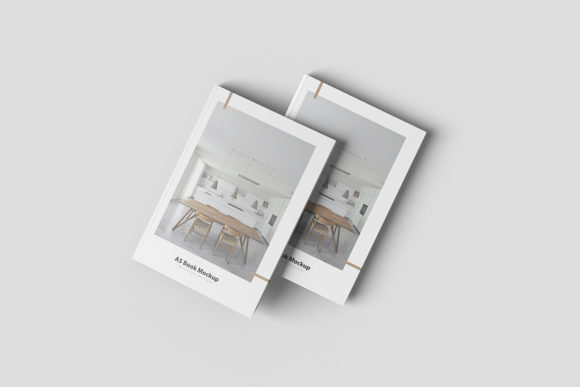
In the competitive world of creative services, the difference between a rejected proposal and a signed contract often lies in how you present your work. Clients need to visualize the final product, not just imagine it from a flat image. This is where the Minimal A5 Book Mockup becomes an indispensable asset. It bridges the gap between digital concepts and tangible reality, offering a realistic 3D display that elevates your portfolio instantly.
This tool is designed for speed and precision. Whether you are a freelancer pitching a new novel, a marketer launching a corporate brochure, or an educator preparing course materials, having a high-quality presentation template saves hours of manual editing. The ability to swap designs quickly using smart-object features means you can focus on creativity rather than technical setup.
Why Presentation Matters in Modern Design
Design is no longer just about aesthetics; it is about communication. When you submit a design file without context, the client sees layers and pixels. However, when they see their content applied to a photorealistic book cover, they see value. The Minimal A5 Book Mockup provides that context immediately.
The A5 format is particularly versatile. It is the standard size for many trade paperbacks, professional reports, and compact brochures. By utilizing this specific dimension, you ensure that your mockups align with real-world printing standards. This attention to detail signals professionalism. It tells your audience that you understand the physical constraints of print media and have thought through the production process before a single page is printed.
Key Features That Drive Efficiency
What sets this mockup apart from generic templates is its user-friendly architecture built within Adobe Photoshop. The core functionality relies on smart objects, which act as containers for your images. Here is why this matters for your workflow:
- Instant Customization: You do not need to be a Photoshop expert to use this. Simply double-click the smart object layer, paste your design, save, and close. The mockup updates automatically, wrapping your art around the spine, front, and back covers with perfect perspective and lighting.
- High-Resolution Output: At 300 dpi with a resolution of 3000x2000 pixels, the files are crisp enough for large displays, web galleries, and even high-quality prints. There is no pixelation or blurriness, ensuring your brand looks sharp on any screen.
- Flexible Backgrounds: One of the most requested features in modern mockups is the ability to change the environment. With this Minimal A5 Book Mockup, you can easily swap out background colors to match your brand palette or create a clean, studio-like look. This flexibility allows you to create multiple variations of the same design for different marketing channels.
- Comprehensive Documentation: If you ever get stuck, a PDF help guide is included. This ensures that even if you are new to smart objects, you can navigate the file structure without frustration.
Practical Applications Across Industries
The utility of this mockup extends far beyond simple graphic design portfolios. Its adaptability makes it suitable for a wide range of professionals who need to showcase printed materials effectively.
For Authors and Publishers
Publishing is a visual industry. Before a book hits the shelves, authors and publishers need to market it. Using this mockup, you can create pre-order visuals for social media, Amazon listings, or press releases. Seeing your manuscript title on a realistic book cover helps potential readers connect emotionally with the story before they even buy it.
For Corporate Marketers and Entrepreneurs
Businesses often produce white papers, annual reports, and training manuals in A5 format. Presenting these documents as flat JPEGs can feel amateurish. By placing your corporate data into the Minimal A5 Book Mockup, you transform dry statistics into a premium-looking resource. This enhances the perceived authority of your company and increases engagement with stakeholders.
For Educators and Content Creators
Educators creating workbooks, teachers' guides, or student handouts benefit significantly from realistic previews. When designing curriculum materials, seeing the final layout helps identify spacing issues or font readability problems that might be missed on a computer screen. Furthermore, selling educational resources online requires attractive thumbnails; this mockup provides exactly that.
For Freelancers and Agencies
Freelancers often wear many hats, managing everything from branding to web design. Time is money. The efficiency of this tool allows you to generate client presentations in minutes rather than hours. You can quickly iterate through different color schemes or layouts to give clients options, speeding up the approval process and keeping projects moving forward.
Maximizing Value Through Realism
The strength of this mockup lies in its minimalism. Unlike cluttered scenes filled with coffee cups, laptops, and books, this template keeps the focus squarely on your design. In a crowded digital feed, simplicity often stands out more than complexity. By removing distractions, you allow the viewer to appreciate the typography, color theory, and layout choices you have made.
However, realism does not mean rigidity. The lighting and shadows are rendered to mimic natural environments, adding depth and weight to the object. This tactile quality triggers a psychological response in viewers, making them feel like they could reach out and touch the book. This "tactile simulation" is crucial for building trust in your design capabilities.
Considerations for Implementation
While the tool is powerful, successful implementation requires a few practical steps. First, ensure your source files are set to the correct dimensions before importing them into the smart object. While the mockup handles scaling, starting with a properly sized file prevents distortion.
Second, remember that the photos used in preview images are for illustration purposes only. Do not assume the exact background or lighting conditions will remain static unless you choose to keep them. Use the changeable background feature to tailor the scene to your specific needs. For instance, a dark background might suit a luxury brand, while a light, airy background works better for educational or lifestyle products.
Finally, always check your text legibility. When applying your design to a curved surface like a book spine, some fonts may become difficult to read depending on the angle. Test your designs at various zoom levels to ensure clarity before sharing them with clients.
Conclusion
In an era where digital impressions define professional reputation, the Minimal A5 Book Mockup offers a straightforward path to elevated presentation. It combines technical ease with high-fidelity results, allowing designers, marketers, and creators to showcase their work with confidence. By leveraging smart objects and high-resolution assets, you can streamline your workflow and deliver polished, professional visuals that resonate with your audience. Whether you are launching a new product, securing a publishing deal, or simply updating your portfolio, this tool provides the realistic context needed to turn good designs into great opportunities.