Maximizing Visual Impact with a Greeting Frame Christmas Mockup for Professional Projects
In the crowded digital landscape, where attention spans are fleeting and visual standards are perpetually rising, professionals need assets that bridge the gap between creativity and technical precision. The Greeting Frame Christmas Mockup represents a specific category of design resources that addresses the unique challenges of holiday marketing. Unlike generic templates, this bundle is engineered to provide a sophisticated backdrop for branding, social media campaigns, and editorial content while maintaining rigorous structural integrity.
Understanding the distinction between a standard image file and a functional mockup is the first step in evaluating whether this resource fits your workflow. This collection leverages smart layer objects and defined safety zones to streamline the integration of custom designs. For entrepreneurs, magazine editors, and social media managers, the ability to quickly deploy high-resolution visuals without compromising on quality is often the deciding factor in project success.
Defining the Core Capabilities of the Bundle
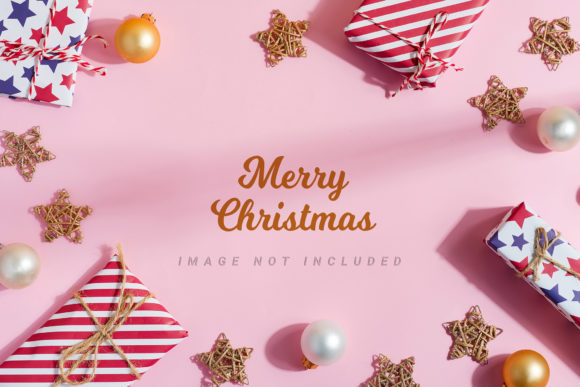
The fundamental value of the Greeting frame from Christmas gift boxes and decoration lies in its realistic application. These files are not 3D renders or vector illustrations; they are high-fidelity photographs designed to serve as dynamic backgrounds. This distinction is crucial for designers who require photorealism but lack the budget or time to stage a physical photoshoot. By using these images, users can place their typography, logos, or product shots onto surfaces that mimic real-world textures like ribbons, paper, and festive decor.
A standout feature of this specific bundle is the inclusion of active smart objects paired with safety zones. In many lower-quality mockups, placing a design too close to the edge results in it being cropped out during export. Here, the safety zone acts as a visual guide—a line indicating exactly where the object must remain to ensure visibility. Users simply activate the layer to see these boundaries, paste their design into the smart object, and save. This mechanism significantly reduces the margin for error and accelerates the production timeline.
The resolution provided, ranging from 6016 × 4016 px to 4016 × 6016 px at 300 DPI, ensures that the output is suitable for both large-format printing and high-density digital displays. Whether the goal is a crisp print ad for a local boutique or a sharp Instagram story for a global brand, the pixel density supports versatile cropping needs. This flexibility allows creators to extract multiple compositions from a single source file, maximizing the return on investment for each purchase.
Evaluating Fit: When to Choose a Photo-Based Mockup
Selecting the right tool depends heavily on the intended medium and the desired aesthetic. A Greeting Frame Christmas Mockup is particularly well-suited for scenarios requiring authenticity. Because the background is a photograph, it captures natural lighting, shadows, and texture variations that vector graphics often struggle to replicate convincingly. This makes it an ideal choice for:
- Social Media Content: Platforms like Instagram and Pinterest rely heavily on lifestyle imagery. Using a photo-based mockup helps a brand blend promotional material with organic-looking content, making advertisements feel less intrusive.
- Editorial and Magazines: Publications often require high-resolution assets that hold up under print scrutiny. The 300 DPI specification ensures that text remains legible and images do not pixelate when printed in glossy magazines or brochures.
- Entrepreneurial Branding: Small business owners frequently need to present professional proposals or seasonal offers. This tool allows them to create a cohesive look for greeting cards, gift box labels, or website headers without hiring a photographer.
However, the limitations of a photographic approach must be acknowledged. Since the background is a static photo, the lighting conditions and color palette of the scene are fixed. If a brand's identity requires a specific background color that does not match the mockup, this tool may not be the correct solution. The documentation explicitly notes that the background or design color does not change, meaning the creative freedom lies in the foreground elements rather than the environment.
Comparative Analysis: Photo Mockups vs. Vector Templates
When researching design resources, professionals often weigh the pros and cons of photo-based mockups against vector-based templates. While vector templates offer the advantage of infinite scalability and full color customization, they often lack the tactile realism that consumers expect from holiday-themed content. A vector illustration of a Christmas box might look clean, but it can appear flat and artificial compared to a photograph of actual ribbon and wrapping paper.
Conversely, some users prefer fully editable 3D environments where every light source and surface angle can be manipulated. However, these tools typically require advanced software skills (such as Blender or Cinema 4D) and significant processing power. The Greeting Frame Christmas Mockup occupies a middle ground. It offers the realism of photography with the ease of use found in standard design software like Adobe Photoshop. The tradeoff is a lack of environmental control, but for most marketing purposes, the speed and visual impact outweigh the inability to move the camera angle.
Another point of comparison is the "Safety Zone" feature. Many free or low-cost alternatives omit clear indicators for safe placement areas, forcing the designer to guess or manually test exports repeatedly. This bundle includes explicit instructions and visual guides for these zones, reducing the risk of costly mistakes. For busy professionals managing tight deadlines, this efficiency gain is often more valuable than the marginal cost difference between premium and free resources.
Navigating Technical Constraints and Best Practices
To get the most out of this asset, it is essential to understand the technical workflow. The archive includes specific file instructions, which are vital for users who may be new to working with smart objects. The process involves dropping the design into the designated area, ensuring it stays within the safety lines, and saving the file to update the preview. Skipping the activation of the safety zone layer can lead to frustration if part of the design is accidentally hidden.
Typography is another critical consideration. The package explicitly states that applied typography is NOT INCLUDED. This is a common feature in mockup bundles, as it allows the user to apply their own fonts and messaging. However, it means that the final result relies entirely on the quality of the user's typographic choices. Designers should ensure that their headline and copy have sufficient contrast against the busy background of the Christmas decorations. The generous amount of negative space included in the design is intentional, providing a canvas for bold headlines or detailed copy without cluttering the festive theme.
Cropping strategies also play a role in maximizing value. Since the files are high-resolution, users can crop the original image to focus on specific details, such as a corner of a gift box or a cluster of ornaments, creating secondary assets for different platforms. This versatility transforms a single purchase into a suite of assets suitable for email headers, blog post thumbnails, and hero sections on landing pages.
Making the Final Decision
Ultimately, the decision to utilize a Greeting Frame Christmas Mockup comes down to the balance between realism, efficiency, and budget. For projects where the atmosphere of the holidays is paramount—where the texture of paper and the sheen of ribbon convey the message as much as the words themselves—this bundle is a superior choice. It eliminates the logistical hurdles of physical photography while delivering a polished, professional finish.
If the requirement is for a highly stylized, abstract, or fully customizable 3D environment, other options may be more appropriate. Similarly, if the project demands a specific background color that cannot be achieved through the existing photo, a vector template or a custom photoshoot would be necessary. But for the vast majority of commercial applications, from social media campaigns to print materials, the combination of high resolution, smart object functionality, and realistic detail makes this a robust tool for any creative professional.
By leveraging the safety zones and understanding the fixed nature of the background, users can produce high-impact visuals efficiently. The inclusion of detailed instructions further lowers the barrier to entry, making it accessible even to those who are not expert Photoshop users. In a market saturated with generic clip art, choosing a resource that prioritizes photorealism and structural intelligence is a strategic move that enhances the perceived value of the final output.