Christmas Craft Envelope and White Card: A Practical Guide to Design Integration
The intersection of traditional holiday aesthetics and modern digital design tools has created a unique demand for assets that bridge the gap between physical craft and virtual presentation. The Christmas Craft Envelope and White Card stands out in this crowded marketplace not merely as a visual asset, but as a functional tool designed for precision and ease of use. For designers, hobbyists, and marketing professionals aged 20 to 50 who are evaluating resources for their seasonal projects, understanding the specific mechanics of this product is essential before committing to a download or purchase.
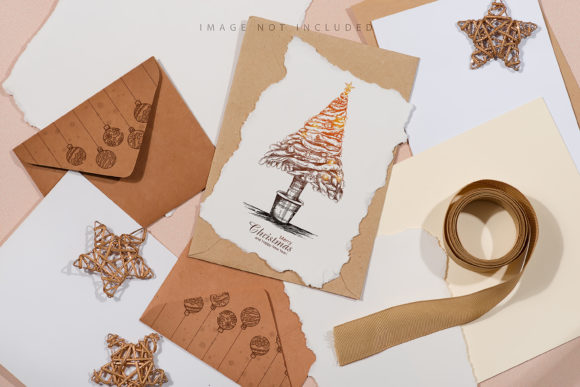
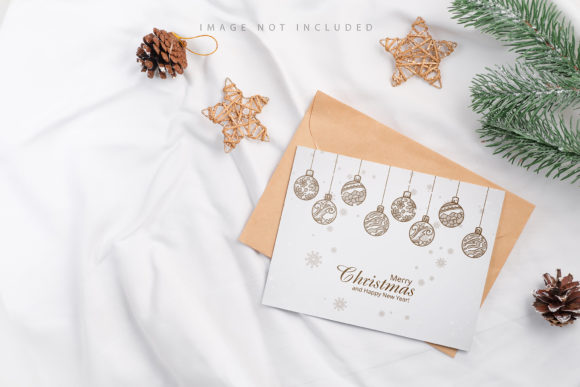
This resource is defined by its high-resolution specifications and its intelligent layering system. Unlike generic clip art or static images, the Christmas Craft Envelope and White Card operates as a sophisticated mockup template. It allows users to visualize their designs within a realistic context without needing advanced 3D modeling skills. The core value lies in its ability to simulate a tangible product—specifically a festive envelope paired with a crisp white card—using a standard Photoshop workflow. This approach ensures that the final output looks like a photograph rather than a vector illustration or a rendered 3D model, providing an authenticity that is crucial for convincing clients or showcasing personal portfolios.
Understanding the Technical Architecture
At the heart of this design solution is the active smart object feature. In the realm of graphic design, efficiency is often measured by how quickly a user can iterate on ideas without breaking the integrity of the file. The Christmas Craft Envelope and White Card addresses this by incorporating a dedicated safety zone within the smart object layer. When a designer opens the .psd file, they are presented with a structure where the background remains static while the central area is designated for content insertion.
The process is straightforward yet powerful. Users paste their design into the smart object, save the changes, and the application automatically maps the artwork onto the curved surfaces of the envelope and the flat plane of the card. This eliminates the need for manual warping, perspective masking, or complex blending modes. However, it is important to note that the dimensions of the file are substantial, measuring 6016×4016 pixels at 300 DPI. This resolution ensures that the image retains sharpness even when printed for large formats or viewed on high-density displays, making it suitable for both web presentations and print proofs.
A critical component of this architecture is the safety zone documentation. These lines serve as a visual guide, delineating the area where the design will be visible versus the areas that may be obscured by folds or shadows. By activating the specific layer that reveals these boundaries, designers can ensure their typography and graphics do not get cut off or hidden behind the structural elements of the envelope. This feature transforms what could be a trial-and-error process into a precise operation, significantly reducing the time spent on adjustments.
Evaluating Fit and Functionality
When comparing the Christmas Craft Envelope and White Card to other design resources, the distinction lies in its realism and workflow integration. Many alternatives on the market offer 3D renderings or vector-based templates. While 3D models offer flexibility in lighting and angle, they often require expensive software plugins or steep learning curves. Vector files, conversely, lack the textural depth of paper grain and shadow that gives a design a sense of weight and reality.
This particular mockup sits in a "sweet spot" between these extremes. It provides the photorealistic quality of a high-end photo shoot without the technical overhead of 3D rendering. The background and design colors remain fixed, which is a deliberate choice to maintain consistency. If a designer needs to change the ambient lighting color or the texture of the paper itself, this tool does not support that level of customization. Instead, it focuses entirely on how the user's content interacts with the form. This makes it an ideal choice for scenarios where the focus must remain strictly on the layout, typography, and branding of the message inside the card.
However, this limitation also defines its best-fit situations. If your project requires a dynamic background that shifts from a snowy landscape to a warm fireplace, or if you need to alter the material of the envelope to gold foil or textured kraft paper, this specific file will not suffice. It is designed for a specific aesthetic: a clean, professional look where the envelope and card are the stars. For those looking to create a whimsical, hand-drawn style where the background is just as important as the foreground, a different category of asset might be more appropriate.
Comparative Analysis of Design Approaches
To make an informed decision, it is helpful to view the Christmas Craft Envelope and White Card within the broader context of available design strategies. Let us consider three common approaches used in holiday marketing and crafting:
- Full-Scene Photography: This involves staging a physical set, taking photos, and compositing designs later. While this offers the highest level of control over lighting and environment, it is time-consuming, expensive, and difficult to scale. The mockup file serves as a digital shortcut to this method, offering similar visual results with a fraction of the effort.
- Standard Flat Mockups: These are simple overlays placed on top of a design. They often lack perspective distortion, making the result look like a sticker pasted on a surface rather than a folded piece of paper. The Christmas Craft Envelope and White Card surpasses this by utilizing smart objects to wrap the design around the actual geometry of the envelope.
- 3D Rendering Engines: Software like Blender or Cinema 4D allows for infinite manipulation. While superior for custom angles, the learning curve is steep. For a quick turnaround on a holiday campaign, the smart object workflow of this specific tool is far more practical.
The tradeoff here is clear. You gain speed and ease of use by using the smart object system, but you lose the ability to manipulate the scene's lighting and camera angles. The typography included in the preview images is explicitly noted as NOT INCLUDED. This is a common practice in high-quality mockups to avoid copyright issues and to encourage users to apply their own brand identity. It means the user must bring their own font selection and logo assets, ensuring the final output is unique to their brand rather than a generic template.
Decision Factors and Use Cases
Choosing whether to utilize the Christmas Craft Envelope and White Card depends largely on the end goal of the project. If you are a social media manager preparing a series of posts for December, this asset is highly effective. The high resolution (300 DPI) ensures that the images look crisp on Instagram or Facebook feeds, and the safety zone prevents accidental cropping of vital information during the upload process.
Similarly, for freelance graphic designers pitching concepts to clients, presenting a design inside a realistic envelope adds a layer of professionalism that flat files cannot match. It helps the client visualize the final product, bridging the gap between a digital concept and a physical deliverable. The inclusion of documentation in the .psd file further supports this professional workflow, guiding users through the necessary steps to activate the safety zones and correctly place their layers.
Conversely, if the project involves creating a children's book illustration where the background plays a narrative role, or if the design requires a specific paper texture that differs from the default provided, this tool may fall short. In such cases, a photographer might be a better investment, or a different type of mockup that allows for background replacement would be necessary. The key is to recognize that this is a specialized tool for a specific type of presentation.
Maximizing the Workflow
For those who decide this is the right tool for their needs, the path to success involves respecting the limitations of the format. The most common pitfall is ignoring the safety zone lines. Because the envelope has folds and creases, placing text too close to the edge can result in it being hidden or distorted. Activating the visibility layer that shows these boundaries is a non-negotiable step in the workflow.
Additionally, because the background color does not change, users should plan their composition with the existing backdrop in mind. If the mockup features a neutral background, it is versatile for many brands. However, if the mockup includes a specific holiday pattern, that pattern will remain constant. This constraint actually serves as a benefit for brand consistency; it ensures that the focus remains on the card and envelope without distracting environmental elements shifting around.
In conclusion, the Christmas Craft Envelope and White Card represents a pragmatic solution for modern design challenges. It combines the aesthetic appeal of a high-quality photograph with the technical convenience of Adobe Photoshop's smart object technology. While it does not offer the limitless flexibility of 3D modeling or the full creative freedom of photography, it excels in its specific domain: rapid, professional visualization of holiday stationery. For adults seeking to elevate their holiday communications without getting bogged down in technical complexities, this resource offers a balanced blend of quality, ease, and reliability.