Easter Mockup Card for Creative Designs
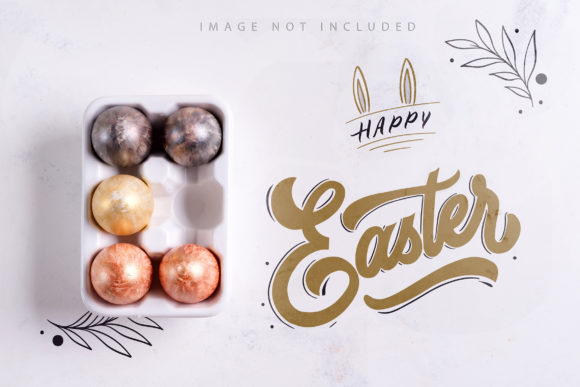
If you are looking to elevate your holiday branding or create stunning visuals for your upcoming campaigns, an Easter Mockup Card is the perfect tool. This resource features a beautifully styled scene with a ceramic egg tray holding gold and silver painted Easter eggs set against a clean white stone background. The image captures the essence of the season while providing a professional, high-end aesthetic that works seamlessly for various creative projects.
Whether you are a seasoned graphic designer, a small business owner planning a seasonal sale, or a blogger writing about spring traditions, this mockup bundle offers versatility that saves you time and effort. Instead of setting up a complex photoshoot or struggling with 3D rendering software, you can utilize these high-quality photo mockups to present your designs in a realistic context immediately.
Why Choose a Photo-Based Easter Design Tool?
In the world of digital marketing and content creation, authenticity matters. While 3D renders and vector graphics have their place, there is something undeniably warm and inviting about a photograph. This Easter Mockup Card is not a 3D model or a vector illustration; it is a real photo captured at full resolution. This distinction is crucial because it provides natural lighting, texture, and depth that users instinctively trust.
The specific design elements here—gold and silver painted eggs on a ceramic tray over white stone—create a sophisticated backdrop. It avoids the clutter often associated with traditional Easter imagery, leaving plenty of negative space for your message. This balance allows your text or product to stand out without competing with a busy background. For entrepreneurs and marketers, this means your promotional materials will look polished and intentional, whether they appear on a website header, an Instagram story, or a printed magazine ad.
How Smart Objects Simplify Your Workflow
One of the most significant advantages of using this bundle is the inclusion of active smart objects. If you are new to design software like Adobe Photoshop, the term might sound technical, but the process is incredibly straightforward. A smart object acts as a container where you can drop your own artwork, logos, or typography.
To use the Easter Mockup Card, you simply paste your design into the designated smart layer and save the file. The software automatically applies your design to the mockup, adjusting perspective and blending it naturally with the scene. You do not need to manually mask edges or adjust shadows. This feature makes the tool accessible for beginners who want professional results without spending hours learning complex editing techniques.
- Efficiency: Drop your design and save. The rest happens automatically.
- Flexibility: Change your design anytime by reopening the smart object layer.
- Consistency: Ensure your branding looks uniform across different formats.
Practical Applications for Creators and Businesses
The utility of this mockup extends far beyond simple decoration. Because the image includes ample space for headlines and copy, it serves as a versatile canvas for communication. Here are several ways you can leverage this asset in your daily work:
- Social Media Campaigns: Use the image as a hero section for your blog posts or as a featured image on Facebook and LinkedIn. The white stone background ensures that any color palette you choose for your text will pop, making your posts more engaging for followers.
- Email Marketing: Incorporate the mockup into your newsletter headers. The elegant gold and silver tones convey luxury and care, which can increase open rates and click-throughs for your Easter promotions.
- E-commerce Listings: If you sell handmade goods, digital downloads, or seasonal products, this mockup helps visualize your items. Even if you don't have physical products yet, you can simulate how a gift card or a digital coupon would look in a festive setting.
- Print Materials: With a resolution of 300 DPI, these files are print-ready. You can use them for flyers, postcards, or even custom packaging inserts for your Easter baskets.
Navigating Safety Zones for Perfect Placement
When working with any mockup, one common challenge is ensuring your design fits perfectly without getting cut off or hidden behind important elements. To solve this, the archive includes a dedicated safety zone feature. These are subtle lines visible only when you activate a specific layer within the file.
The safety zone outlines the area inside the smart object that remains safe from being obscured by the surrounding scene. By keeping your critical text or logo elements within these boundaries, you guarantee that your message is always fully visible. Once you have placed your design correctly, you can deactivate the safety zone layer to see the final, clean result. This attention to detail makes the Easter Mockup Card user-friendly and reduces the risk of errors in your final output.
Important Considerations Before You Start
While this tool is designed to be easy to use, understanding its limitations ensures you get the best possible outcome. It is important to remember that the background and the design color of the mockup itself do not change. The gold and silver eggs and the white stone surface are fixed photographic elements. This means you cannot turn the eggs blue or the background pink through the smart object layer.
Additionally, the typography applied in the example images is not included. You must add your own text using your preferred font tools. This gives you complete creative control to match your brand voice, whether you prefer playful scripts for a children's event or sleek sans-serifs for a corporate announcement.
Before purchasing or downloading, consider the following:
- Resolution Needs: Since the photos are provided at full resolution, you have the freedom to crop them to fit specific dimensions. However, ensure your final export size matches your intended platform requirements.
- File Instructions: The archive includes a greeting file and detailed instructions for working with the mockups. Take a moment to review these guides, especially if you are unfamiliar with smart objects.
- Brand Alignment: Verify that the elegant, minimalist style of the ceramic tray and stone background aligns with your current brand identity. It is particularly well-suited for brands focusing on quality, tradition, and sophistication.
Maximizing Value with Versatile Assets
In a fast-paced digital environment, having assets that can be repurposed quickly is invaluable. This Easter Mockup Card bundle is built to support that need. Whether you are creating a single social media post or a comprehensive marketing campaign spanning multiple channels, the ability to quickly swap out your designs while maintaining a consistent visual theme is a game-changer.
The combination of high resolution, smart object functionality, and thoughtful composition makes this a robust solution for anyone involved in content creation. From educators preparing classroom materials to freelancers pitching ideas to clients, the practical benefits are clear. You spend less time fighting with software and more time focusing on your creative vision and strategy.
By integrating this mockup into your workflow, you are not just adding an image; you are adopting a professional standard for your visual communications. The golden and silver accents add a touch of celebration, while the clean layout ensures your message remains the star of the show. Embrace the convenience of modern design tools to make your Easter projects stand out this year.